UI Display Issue on Model Training Page (LoRA/DoRA) - Cut off on MacBook Air 13
D
ear SeaArt.AI Team,
I am a regular user of your platform. I would like to report a UI/UX issue on the Model Training section, specifically on the page for creating LoRA / DoRA.
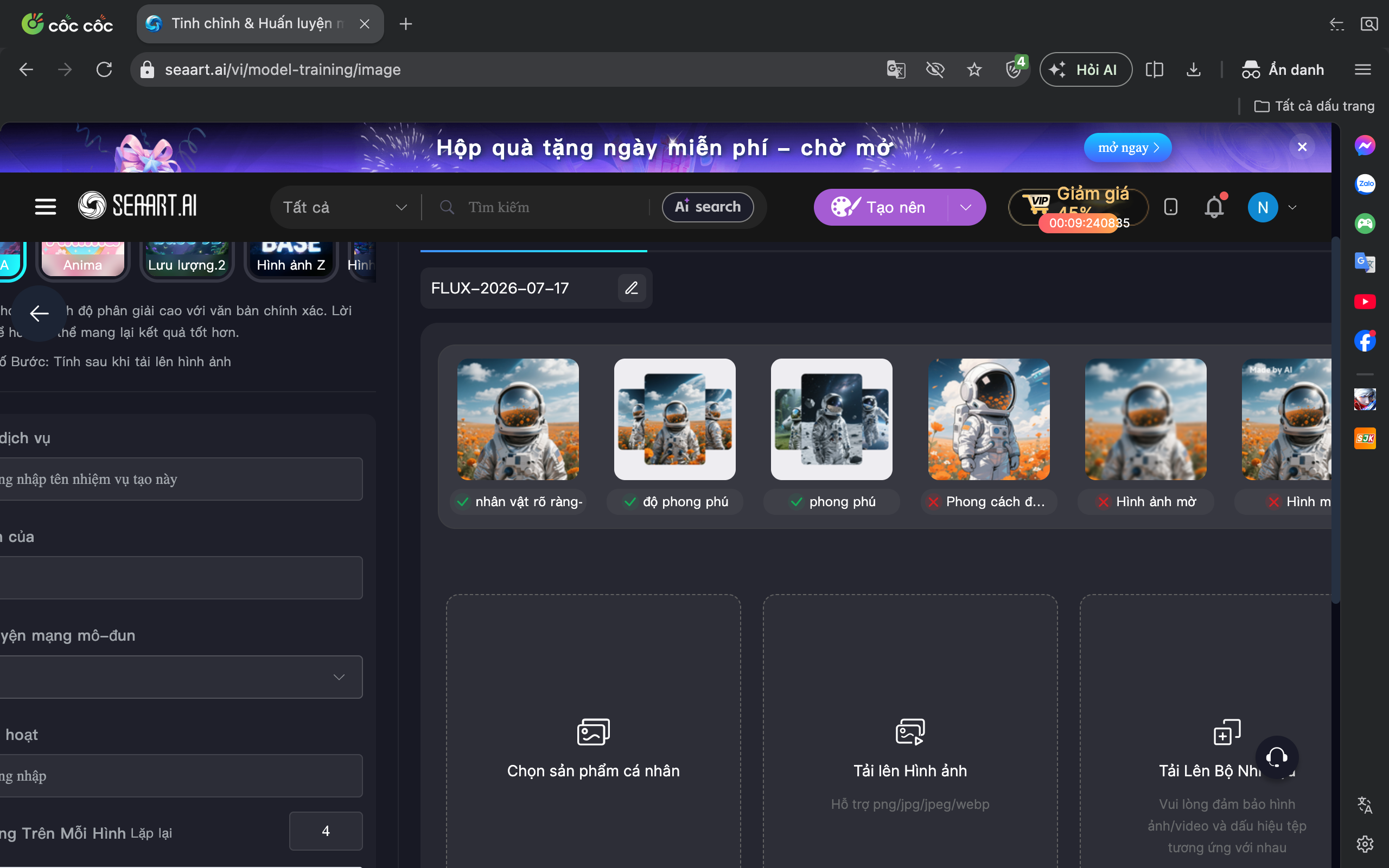
Problem Description: When accessing the page seart.ai/vi/model-training/image, the interface is cut off and partially hidden, especially on the left side and bottom area. I cannot fully see important sections such as:
Training settings/options
Task name input field
File upload buttons (Choose personal product, Upload image, Upload image set, etc.)
Device Affected:
MacBook Air 2020 (13-inch screen)
Browser: Cốc Cốc (also tested on Chrome with the same issue)
Please find the screenshot attached below for reference:
Request: I kindly ask the team to prioritize fixing and optimizing the Training interface so that it displays fully and properly on common laptop screens, especially MacBook Air 13-inch models. This issue is currently making it very difficult for me to work and train models effectively.
Thank you for your attention and for resolving this issue soon!
Best regards,
Log in to comment and vote
Comments2
JJJJulio
Aug 11
Thank you for your feedback.
Your suggestion has been adopted; please stay tuned for updates.
Nhớ Đặng
Jul 25
Display the hidden interface on the computer like this.